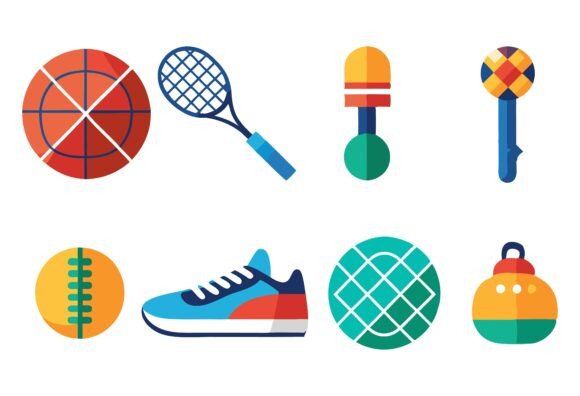
Choosing the Right Sport Equipment Icons for Your Project: A Practical Guide
When you’re designing a sports app, building a fitness infographic, or creating a brand identity for a club, icons do more than fill space. They communicate instantly. The Sport Equipment Icons collection from our Special AI EPS series offers a structured vector solution that aims to save you time while maintaining visual consistency. But no single icon set fits every project. This article breaks down what makes this collection distinct, how it compares with other approaches, and when it might—or might not—be the right fit for your workflow.
What Makes the Sport Equipment Icons Collection Distinct?
This collection is not a loose bundle of random graphics. Each icon is provided in three variations, giving you flexibility without having to start from scratch for different contexts—whether you need a filled style, an outlined version, or a color variant. The files come in industry-standard AI (Adobe Illustrator) and EPS formats, plus a JPG preview for quick reference. That means you can open them on both Mac and Windows without compatibility issues.
What stands out is the attention to file and layer organization. Neatly organized layers sound like a small detail, but when you are tweaking dozens of icons for a unified look, structured layers make the difference between a ten-minute edit and a half-hour hunt. You can change colors, adjust strokes, or modify elements easily because the layers are named and separated logically. This design-for-editability approach is central to the collection’s value.
The icons are also described as having perfection in details and consistency. For a sports-related project, consistency in line thickness, corner rounding, and visual weight across all icons ensures your final output looks professional. Whether you are working on a website, an app interface, or a printed poster, that consistency reduces the polish work you would otherwise have to do manually.
Comparing Icon Formats: Vector vs. Raster and AI/EPS vs. SVG
To evaluate this collection fairly, you need to understand how its format compares with common alternatives:
- Vector vs. Raster: Because these are vector icons, you can scale them to any size without losing quality. A raster icon (like a standard PNG) becomes pixelated when enlarged. For print or high-resolution displays, vectors are usually the better choice. The included JPG files are raster previews; they are useful for mockups or quick placements, but the real power lies in the AI and EPS vectors.
- AI/EPS vs. SVG: AI and EPS are proprietary formats that require Adobe Illustrator (or a compatible editor like Inkscape) to edit. SVG is an open web standard that works directly in browsers without additional software. If your primary output is web-based—say, an online store or a mobile web app—you might prefer SVG for native support. However, you can export SVG from AI or EPS, so this collection can still serve as a source for web projects. The tradeoff is an extra conversion step.
Decision factor: If you or your team already work in the Adobe ecosystem, AI/EPS is a natural fit. If you rely solely on web-native tools and code, you may want to check whether you have the means to convert files or whether a pure SVG set would be more direct. This collection gives you the flexibility to do either, but it does require a vector editor to edit the source.
When to Opt for the Sport Equipment Icons Collection Over Alternatives
There are many ways to get sport-related icons: free icon libraries, hiring a designer, or purchasing other bundles. Here is how this collection compares in realistic scenarios:
- Custom design: A bespoke set from a designer can be tailored perfectly to your brand, but it is expensive and time-consuming. This collection offers a ready-made starting point that you can still customize—changing colors, combining elements, or applying a brand palette. If you have basic vector skills, you can achieve a semi-custom result for a fraction of the cost.
- Free icon sets: Sites like Font Awesome or Material Design offer free sport-related icons, but they typically provide only one style per icon. This collection includes three variations, which can be helpful when you need, for example, a filled version for buttons and an outline version for sidebars, without inconsistent scaling or stroke widths. The tradeoff is cost; free sets have no fee but may lack the detail and variety you need.
- Other paid icon bundles: Many marketplaces sell icon packs, but not all maintain the same level of layer organization or variation. Some bundles give you dozens of icons but only in one style. This collection’s multiple variations mean you can visually differentiate active states, categories, or emphasis levels without designing extra icons.
A limitation to consider: the collection covers many common sport equipment topics (balls, nets, rackets, etc.), but if you need a very niche sport or a specific cultural variant, you may need to supplement or create it yourself. The editable format helps, but you still need to do the work.
Practical Use Cases and Decision Factors
Let's look at specific projects and how this collection fits:
- Print materials (posters, brochures, banners): AI/EPS files can be set up in CMYK color mode, which is a must for professional printing. The vectors ensure crisp output even at large sizes. The JPG previews are handy for client approvals.
- Web and UI design: For a sports app, you can open the AI files, change colors to match your UI palette, and export each icon as PNG or SVG. The multiple variations allow you to use, say, a colored ball icon for the home screen and an outline version for settings. The structured layers make it easy to create hover states or dark-mode alternatives.
- Infographics and data visualizations: Consistency in icon style helps the viewer focus on the data. The icons here are detailed enough to be recognizable at small sizes, and you can combine them with text or charts. If you need to illustrate “sport equipment” as a category, a unified set improves readability.
- Brand identity: If you are building a brand around a gym, a sports club, or an event, these icons can form part of your visual language. You can standardize colors and apply them across all communications. The ease of editing means you can adapt icons as the brand evolves.
Key decision factors to weigh:
- Software access: Do you have Adobe Illustrator or a compatible alternative (e.g., Affinity Designer, Inkscape)? If not, you cannot directly edit the AI/EPS files. You would be limited to the JPGs, which defeats the purpose.
- Time vs. uniqueness: The time saved by not designing icons from scratch is significant. But if you use these icons without any modifications, your visuals may look similar to others who purchase the same set. Plan to customize colors or combine elements to create a distinct look.
- Variety needed: Three variations per icon is generous, but if you need a fourth style (e.g., two-color gradient or monoline), you will have to create it yourself. The foundation is solid, but it is not a complete style guide.
Making the Right Choice for Your Project
No single icon collection is perfect for every task. The Sport Equipment Icons set from the Special AI EPS series is a well-organized, designer-friendly resource that excels in scenarios where you need vector flexibility, multiple style options, and quick editability. It is best suited for:
- Designers and developers who already use vector editing software.
- Projects that require both print and digital output from the same source files.
- Teams that value consistency and want to avoid redrawing icons for different use cases.
- Budgets that are moderate—less than hiring a designer but more than zero cost.
Consider alternative paths if you:
- Need icons optimized for web delivery without any conversion step.
- Prefer fully open-source solutions to avoid licensing overhead.
- Require a very narrow or highly specialized sport icon set not covered here.
- Have no vector editing experience and only need quick, fixed-size PNGs.
Ultimately, the choice depends on matching the tool to your workflow. If the combination of 3 variations, AI/EPS and JPG, organized layer structure, and ease of customization aligns with your typical design process, this collection can become a go-to resource. For many designers and content creators, that balance of quality, flexibility, and time savings is exactly what they need to keep projects moving without sacrificing detail.
Take a moment to review the specific icons included and imagine how they would look in your layout. A small upfront evaluation of your export requirements and editing environment will confirm whether this set is the practical choice for your next sports-related project.