What Gematry Keynote Offers for Your Slides
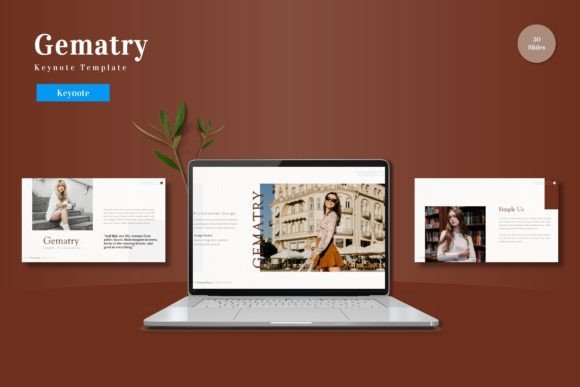
Building a presentation from scratch often means wrestling with alignment, font pairing, and color harmony. For many professionals, this design work pulls focus from the actual content. The Gematry - Keynote Template addresses this gap by offering a complete visual system that balances structure with flexibility. With 150 slides distributed across five distinct color schemes, this template is built to support a variety of presenters, from corporate marketers to freelance creatives.
Understanding what makes a template work for your specific situation can save hours of effort. This article explores the practical features of Gematry through the eyes of different users, helping you evaluate whether it matches your workflow, skill level, and project demands.
A Versatile Foundation for Diverse Audiences
The structure of a template determines how easily you can adapt it to different contexts. Gematry - Keynote Template is organized around five complete color variations, each containing 30 slides. This layout is particularly valuable for professionals who regularly present to distinct audiences. A business consultant, for example, might use the cooler palette for a formal quarterly review and a warmer one for a creative brainstorming session with stakeholders.
For educators and trainers, the inclusion of section break slides provides natural stopping points within a lecture or workshop. You can use these breaks to introduce new topics or summarize key concepts. The handcrafted infographics further support instructional goals by turning abstract data into visual narratives. Instead of building charts from individual shapes, you get a starting point that is both editable and visually coherent.
Beginners and students benefit most from the picture placeholders. Rather than struggling with cropping, masking, or positioning images, you can drag and drop visuals directly into pre-framed layouts. This lowers the technical barrier, allowing less experienced users to produce slides that look polished and intentional. The focus shifts from how to use the software to what the presentation needs to communicate.
Evaluating Quality and Design Flexibility
A template is only as good as its adaptability under real-world conditions. Gematry relies on Master Slides, a feature that enforces consistency throughout your deck. When multiple people collaborate on a presentation, this ensures that fonts, logos, and color choices stay uniform regardless of who edits a slide. For a small business owner managing their own brand, this level of control replaces the need for a dedicated designer.
The pixel-perfect illustrations included in the template hold up well across different display types. Whether you present on a large conference screen or share a PDF with a client, the graphics remain crisp. For a creative professional or photographer building a portfolio, this visual fidelity matters. The gallery and portfolio slides are structured to highlight images without introducing distracting background elements.
For marketers building data-driven arguments, the variety of infographic layouts provides a practical starting point. You can customize the charts, icons, and text blocks to match your specific metrics without starting from a blank canvas. This combines the speed of a pre-built layout with the authenticity of your own data. The fact that all graphics remain resizable and editable means you are not locked into the original design direction.
Matching the Template to Your Workflow
Different projects demand different degrees of speed and customization. Understanding where Gematry fits within these priorities helps you decide if it suits your current needs.
When speed matters most: The five pre-made color schemes and drag-and-drop placeholders allow you to assemble a complete deck in minutes. If you need to prepare a last-minute pitch or a departmental update, you can focus entirely on content while the template handles the visual structure. The 150-slide count means you are unlikely to run out of appropriate layouts halfway through your project.
When customization is a priority: Because every graphic is resizable and editable, experienced users can push the template beyond its default look. You can swap color schemes, alter illustration positions, and incorporate your own brand assets. Freelancers juggling multiple clients can use the five included themes as starting points, tailoring each one to a specific brand identity without starting over each time.
When long-term value matters: A single-use template offers limited return on investment. Gematry is designed to function as a library you can return to across multiple projects. The 30-slide structure for each color means you can differentiate presentations by theme while maintaining a consistent quality standard. For a blogger who creates regular slide decks for webinars, or a trainer who updates course materials each semester, this reuse factor adds real commercial value.
Practical Examples by Role
- For the entrepreneur pitching to investors: You can pull together a funding deck using the strategy-oriented slides, infographics for market analysis, and portfolio slides for traction metrics. The professional polish helps build credibility without requiring outside design help.
- For the educator structuring a semester course: Section breaks allow you to separate modules. Picture placeholders simplify adding relevant diagrams or screenshots. The consistent layouts help students focus on content rather than being distracted by shifting visual styles.
- For the freelancer building client proposals: The five color variations let you tailor each presentation to a different client industry. The editable infographics help you explain your process or timeline in a visual way that text alone cannot achieve.
- For the corporate professional preparing quarterly reviews: Master Slides ensure compliance with brand guidelines across a team of contributors. The pre-made slides reduce the time spent aligning shapes and formatting text, allowing more time for refining the narrative.
What to Consider Before You Start
Not every template suits every workflow. Evaluating your own priorities helps you determine whether Gematry aligns with your goals.
If your presentations require heavy video integration or highly unconventional layouts, you may need to adapt the existing slides further. The template is built around a structured grid, which supports clarity and consistency but may not accommodate every experimental design impulse. However, for the vast majority of business, educational, and portfolio contexts, this structure is an asset rather than a limitation.
Cost is another factor. For the price of a single custom illustration project or a short stock photography subscription, you gain a comprehensive system. The 150 slides provide a foundation that can serve you across many projects. For value-conscious buyers, the ability to apply the template to multiple presentations increases its overall return.
Reliability matters. Because the template is built on Keynote's Master Slide architecture, it is less prone to the shifting and breaking that can occur with manually constructed slides. This stability is especially important for users who are less experienced with presentation software, as it reduces the chance of accidental formatting errors before a big presentation.
Is It the Right Fit for Your Next Project?
The Gematry - Keynote Template offers a balance of structure and freedom that serves a wide range of presenters. Its 150 slides and five color schemes provide immediate flexibility, while the editable graphics and Master Slides support long-term customization. Whether you are assembling a board-level report, a classroom lecture, or a client proposal, the template reduces the friction between having an idea and presenting it professionally.
For the beginner, it offers a safety net of solid design. For the busy professional, it provides a reliable tool for consistent output. And for the creative user, it leaves room for adaptation and personalization. By matching the template's strengths to your specific needs, you can create presentations that communicate clearly without sacrificing your own time and resources.