Academy Icon Pack: A Versatile Visual Toolkit for Modern Digital Workflows
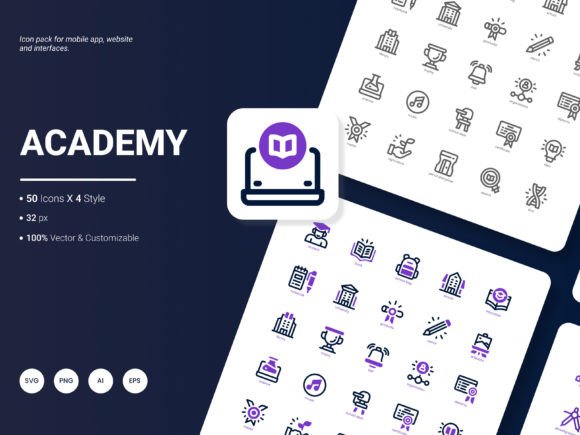
Visual communication sits at the heart of effective digital experiences. Whether you are building a dashboard, designing a learning platform, or preparing a client pitch, the icons you choose shape how information is perceived and understood. The Academy Icon Pack enters this space as a carefully curated set of 200 stylish icons that reflect popular services and ideas across multiple domains. It offers a balanced mix of aesthetic appeal, format flexibility, and editing freedom that serves a wide range of professionals and creators. This article explores the pack's characteristics, practical applications, and the considerations that matter when integrating iconography into real-world projects.
Understanding the Composition of the Academy Icon Pack
At its core, the Academy Icon Pack is built around 200 distinct icons that cover commonly used concepts and services. These icons span topics like education, communication, analytics, media, productivity, and more. Rather than focusing on niche or overly abstract symbols, the pack prioritizes content that resonates with everyday digital interactions. This makes the set immediately useful for projects where clarity and recognition are essential.
The icons are delivered in six file formats: AI, EPS, SVG, PNG, PDF, and JPG. This variety means you can work with the pack regardless of your preferred design environment. SVG and EPS are ideal for scalable vector graphics in web and print, while PNG and JPG offer ready-to-use raster options. AI and PDF provide editable source files for deeper customization. Having all six formats in one package eliminates the need to convert or recreate icons, saving time and reducing friction in your workflow.
Another structural feature is the availability of four distinct styles within the set. This gives you stylistic options without needing to source icons from different packs. Whether your design leans toward flat, outline, filled, or another visual approach, you can maintain consistency by choosing the appropriate style from the Academy Icon Pack. The result is a cohesive visual language that adapts to different contexts without looking mismatched or fragmented.
Editing Flexibility and Integration into Design Systems
One of the most practical advantages of the Academy Icon Pack is how easily the icons can be edited. The vector formats—AI, EPS, and SVG—allow you to modify colors, strokes, sizes, and shapes with precision. This is especially important when you need to match an icon to a specific brand palette or adapt it for different screen densities. Because the icons are crafted with clean paths and well-organized layers, even complex edits remain straightforward.
For teams working with design systems, this editability reduces the overhead of maintaining icon libraries. You can import the AI or SVG files directly into tools like Figma, Sketch, Adobe XD, or Illustrator and adjust them to fit your component library. The icons become building blocks that integrate seamlessly rather than static assets that require manual rework every time a design evolves.
From a developer's perspective, SVG icons are particularly valuable. They scale without quality loss, support CSS styling, and can be embedded inline or loaded as external assets. The Academy Icon Pack's SVG files are structured in a way that makes them easy to reference in code, whether you are building a React component library or a plain HTML interface. The PNG and JPG versions also serve as quick placeholders during prototyping, so designers and developers can move fast without waiting for asset preparation.
Real-World Applications Across Professional Contexts
The versatility of the Academy Icon Pack becomes evident when you consider the range of scenarios where icons play a critical role. Below are several use cases that demonstrate how the pack fits into actual workflows.
Website and User Interface Design
Icons are among the most frequently used elements in web design. Navigation menus, call-to-action buttons, feature lists, and empty states all benefit from recognizable symbols. With 200 icons covering popular services and ideas, you can populate a full website without mixing assets from multiple sources. This consistency improves the user experience because visitors learn to associate certain visual cues with specific actions or content types. For example, a learning management system can use education-themed icons from the pack for course categories, progress indicators, and achievement badges, creating a coherent visual language that supports wayfinding.
Mobile Applications
Mobile interfaces demand icons that are legible at small sizes and responsive to different screen resolutions. The vector formats in the Academy Icon Pack ensure that icons remain crisp on retina displays and across device generations. Because the set includes styles that work well on both light and dark backgrounds, you can design adaptive interfaces without worrying about contrast issues. App onboarding screens, tab bars, settings panels, and notification icons can all be sourced from the same pack, reducing fragmentation in your mobile UI.
Presentations and Analytical Reports
Presentations often rely on icons to break up text-heavy slides and illustrate data points. The Academy Icon Pack provides icons that can replace bullet points, highlight key metrics, and support infographic elements. In analytical reports, icons serve as visual anchors that guide the reader's attention to important findings. For instance, an icon representing growth or analytics can accompany a chart, making the slide more memorable without adding clutter. The PDF format is especially useful here, as it allows you to place icons directly into presentation software without worrying about resolution loss.
Infographics and Templates
Infographics combine data, illustration, and text to tell a story. Icons are the connective tissue that holds these elements together. With the Academy Icon Pack, you can build infographics that feel consistent and professionally designed. The four styles enable you to create visual hierarchy—using outline icons for secondary information and filled icons for primary callouts. Templates, whether for social media posts, resumes, or brochures, also benefit from a unified icon set. Instead of hunting for free icons that may not match, you have a ready-to-use library that fits the template's aesthetic from the start.
Considerations for Choosing the Right Icon Pack
While the Academy Icon Pack offers a strong set of features, it is worth considering how it fits into broader design decisions. Icon packs are not one-size-fits-all, and understanding your own requirements helps you evaluate whether a given set is the right match.
First, consider the scope of your content. The 200 icons cover popular services and ideas, so if your project involves highly specialized or niche concepts, you may need to supplement the pack with custom icons or additional sets. That said, the pack's focus on widely used symbols means it covers the majority of use cases for most websites, apps, and presentations.
Second, evaluate the stylistic cohesion across the four styles. Some projects require a single consistent style, while others benefit from mixing styles for visual interest. Because the Academy Icon Pack offers all four styles within the same set, you can experiment without worrying about incompatible aesthetics. This is a practical advantage over combining icons from different sources, which often results in mismatched weights, proportions, and line thicknesses.
Third, think about the editing workflow. If your team works primarily in vector tools like Illustrator or Figma, the AI, EPS, and SVG formats will be your primary assets. If you need to deliver icons to clients or stakeholders who prefer static files, PNG and JPG are readily available. The inclusion of PDF also adds value for print-oriented projects where vector fidelity is important but the workflow is document-based. The Academy Icon Pack covers all these scenarios, so you are not forced into a single format.
Observations on Icon Trends and Practicality
Icon design trends evolve, but certain principles remain constant. Users expect icons to be instantly recognizable, consistent in style, and scalable across devices. The Academy Icon Pack reflects these principles by focusing on clear silhouettes, balanced proportions, and meaningful symbolism. The icons avoid excessive detail that might become indistinct at small sizes, and they avoid overly abstract representations that could confuse viewers.
One trend that has gained traction in recent years is the shift toward modular and customizable design systems. Icons that can be recolored, resized, and restyled without breaking are increasingly valued. The Academy Icon Pack's vector-first approach aligns with this trend. Because the icons are built with clean geometry and logical grouping, they can be adapted to dark mode, high-contrast accessibility requirements, or brand-specific color schemes with minimal effort.
Another observation is the growing need for icons that work across both digital and print media. A single icon pack that includes SVG for web, PNG for quick use, and PDF for print saves designers from maintaining separate libraries. The Academy Icon Pack's multi-format delivery is a practical response to this cross-media reality. Teams no longer need to regenerate icons for different outputs, which reduces the risk of inconsistencies and errors.
Workflow Integration: From Asset to Finished Product
Integrating the Academy Icon Pack into a typical workflow involves a few straightforward steps. After downloading the pack, you can browse the icons by style or category and select the ones relevant to your project. Because the icons are named consistently, finding specific symbols is quick. From there, you can import the chosen format into your design tool of choice.
For web projects, SVG files can be optimized further with tools like SVGO to reduce file size without sacrificing quality. For mobile apps, you can export icons as PNG at the required resolutions or use SVG directly if your framework supports it. For presentations, copying icons from the PDF or dragging PNG files into slides usually works without issues. The key is that the pack does not impose a rigid workflow—you adapt it to your existing process rather than restructuring your process around the pack.
Teams that collaborate across disciplines also benefit from the common visual language the pack provides. Designers, developers, content writers, and marketers can all reference the same icons, ensuring that what is designed matches what is developed and what is communicated. This alignment reduces misunderstandings and speeds up project timelines.
Future Development and Community Input
Icon packs that remain static eventually become less useful as design needs evolve. The creators of the Academy Icon Pack have encouraged users to share suggestions for what should be included in the next update. This kind of open feedback loop is valuable because it keeps the pack aligned with real-world demands. Whether you need icons for emerging technologies, new service categories, or additional stylistic variations, contributing your perspective helps shape future releases.
If you have used the Academy Icon Pack in a project, or if you have ideas for icons that would make your work easier, writing in with suggestions ensures the pack grows in directions that matter to its users. This collaborative approach is one of the reasons why some icon packs become staples in the design community while others fade away.
Final Thoughts on Practical Icon Usage
Icons are small elements with a large impact on usability and aesthetics. Choosing the right icon pack is not just about visual appeal—it is about how well the icons support your content, how easily they can be adapted, and how consistently they perform across different media. The Academy Icon Pack addresses these factors through its 200 icons, six formats, four styles, and editable vector files. It is designed to be a practical asset for anyone who needs reliable, stylish icons without the overhead of managing multiple sources.
Whether you are a designer building a new interface, a developer assembling a component library, an educator preparing course materials, or a business owner creating marketing collateral, the Academy Icon Pack offers a foundation that saves time and maintains quality. By focusing on popular services and ideas, it covers the ground that most projects need, and by providing flexible formats, it adapts to the way you work. As with any design resource, the real test is how it performs in your specific context. Exploring the pack with your own projects in mind will reveal whether it fits your needs and where it might spark new ideas for visual communication.