Business Schedule Icon Pack: Practical Icons for Modern Design Work
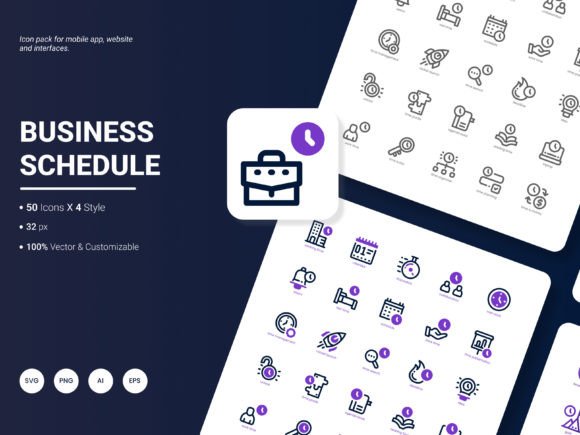
If you have ever built a website, designed a mobile app, or put together a presentation, you know that the little visual details often make the biggest difference. A clean icon can communicate a service or an idea faster than a paragraph of text. That is where the Business Schedule Icon Pack comes into play. It is a collection of 200 stylish icons that represent popular services and ideas, designed to fit naturally into projects ranging from analytical reports to infographics and templates. The icons come in six formats, four styles, and are built to be edited and integrated without friction.
What makes this icon pack different from generic collections
Many icon sets feel either too abstract or too rigid. You end up spending time searching for an icon that matches your brand or message, only to settle for something that almost works. The Business Schedule Icon Pack avoids that problem by focusing on content that people actually need in professional and creative settings. The icons are designed to be fresh and trendy, but not in a way that sacrifices clarity. Whether you need a symbol for scheduling, analytics, communication, or workflow, the pack covers the bases without forcing you to adapt your design to fit the icon.
Having six formats available means you are not locked into one workflow. AI and EPS files work well for vector editing in tools like Adobe Illustrator. SVG files are ideal for web and interface work because they scale cleanly. PNG and JPG give you ready-to-use raster versions for quick placements, and PDF is useful for embedding into documents or sharing with collaborators who do not have design software. The four styles offer variety without overwhelming you with choices that are too similar to tell apart.
Website design and landing pages
When you build a website for a service-based business, icons act as visual anchors. A scheduling page, a pricing table, or a feature section becomes more scannable when each point has an icon next to it. The Business Schedule Icon Pack includes icons that map directly to common business services, which means you can place a calendar icon next to appointment booking, a clock icon next to availability, and a checklist icon next to service details. Visitors process information faster, and the page feels more polished without requiring custom illustration work.
For a freelancer building their own portfolio site, using icons from this pack can save hours. Instead of sourcing icons from multiple free sets that vary in style and quality, you have a consistent visual language from one pack. The editable nature of the files also means you can tweak colors to match your brand palette, which is something free icon sets rarely allow without hassle.
Mobile applications and user interfaces
Mobile apps rely heavily on icons because screen space is limited. A scheduling app, a task manager, or a business dashboard needs icons that are recognizable at small sizes. The Business Schedule Icon Pack is designed with this in mind. The icons are clean and avoid excessive detail that gets lost on smaller screens. If you are developing an app for booking services, managing appointments, or tracking business metrics, the pack provides the core icons you need without forcing you to design them from scratch.
Developers and designers working on minimum viable products especially benefit here. Time is often tight, and you need to get a functional interface in front of users quickly. Having a ready-to-use icon set that is already formatted in SVG and PNG means you can drop icons directly into your interface and focus on functionality rather than visual polish. Later, when you refine the design, you can edit the vector files to adjust stroke weights or colors without redoing the entire icon set.
Presentations that need to communicate clearly
Presentations are about clarity and persuasion. A slide full of bullet points is forgettable, but the same information paired with relevant icons becomes memorable. The Business Schedule Icon Pack is particularly useful for business presentations where you need to explain schedules, workflows, service offerings, or analytical data. Instead of using generic clip art that looks dated, you can place modern icons that match the tone of your content.
Imagine presenting a quarterly report to stakeholders. You have slides covering revenue trends, service utilization, and upcoming initiatives. Using icons from this pack for each section helps the audience follow along without reading every word. A graph icon beside the revenue section, a calendar icon beside the scheduling update, and a gear icon beside operational improvements all create visual cues that guide the viewer naturally. The presentation feels more professional, and you spend less time explaining what each slide is about.
Infographics and data visualization
Infographics blend data with design, and icons are often the connective tissue that makes the information digestible. The Business Schedule Icon Pack works well here because the icons represent services and ideas that are commonly featured in business infographics. Whether you are illustrating a step-by-step process, comparing service features, or mapping a customer journey, the icons provide visual consistency across the graphic.
For marketers and content creators who produce infographics regularly, having a reliable icon pack reduces the back-and-forth of searching for suitable graphics. You can plan your infographic layout knowing that you have icons that fit the topic. The availability of multiple formats also matters because infographics are often exported in different resolutions and file types depending on where they are published.
Templates for documents, proposals, and social media
If you create templates for clients or for your own business, icons are a key component. A proposal template with placeholder icons that look generic will not impress potential clients. Using the Business Schedule Icon Pack, you can build templates that feel designed and intentional. The icons can be swapped in and out depending on the service being offered, and because they are editable, you can adapt them to different template styles.
Social media templates also benefit. A series of Instagram posts promoting different services can use consistent icons from the pack to create a cohesive feed. Each post gets a recognizable visual element, and your audience starts associating the icon with the service. Over time, this builds visual branding without requiring a dedicated illustration budget.
Who gets the most value from this icon pack
Different users will find different reasons to reach for the Business Schedule Icon Pack. Designers appreciate the format flexibility and the editable vector files. Entrepreneurs and small business owners like that the icons represent actual services they offer, making it easy to use them on websites, proposals, and marketing materials without needing to commission custom graphics. Marketers use them in presentations, reports, and social media content where speed and consistency matter.
Educators can also benefit. If you teach business topics, project management, or digital skills, having a set of icons that illustrate scheduling, analytics, and communication helps you create clearer handouts, slide decks, and online course materials. Students process visual information faster, and your materials look more polished without requiring advanced design skills.
Bloggers and publishers who create content around business tips, productivity, or entrepreneurship will find the icons useful for featured images, bullet points, and section dividers. A blog post about time management becomes more engaging when each tip is accompanied by a relevant icon. The pack gives you the visual elements to elevate written content without relying on stock photography that often feels generic.
What to consider before using the icon pack
While the Business Schedule Icon Pack is versatile, thinking about your specific use case will help you get the most out of it. Consider the format you need most often. If you primarily work on web projects, SVG files will be your go-to. If you design in Adobe Illustrator, AI and EPS formats give you the most editing flexibility. For quick mockups, PNG files with transparent backgrounds are convenient because they require no additional software to use.
The four styles offer different visual tones. Before choosing which style to use across your project, review all four options and see which one aligns with your brand personality. Consistency matters more than picking the most intricate style. A simpler style used consistently across all your materials will look more professional than mixing detailed and minimal icons that clash.
Editing capabilities are a strong advantage of this pack. The vector files are structured in a way that allows you to change colors, resize elements, and combine icons without losing quality. If you plan to use the icons in a branded environment, take advantage of this by adjusting the icon colors to match your exact brand palette. This small step makes the icons feel custom even though they come from a pack.
Also consider the scale at which you will use the icons. Some icons look best at medium to large sizes where their details are visible. Others work well as small interface elements. Testing the icons at the actual size you plan to use them helps you avoid surprises later. The SVG and vector formats give you the flexibility to resize without degradation, but the inherent design of each icon determines how well it performs at different scales.
Suggestions for future updates
The Business Schedule Icon Pack already covers a broad range of services and ideas, but there is always room to grow based on how people actually use icons in their work. One area worth expanding is industry-specific icons. Many users work in healthcare, education, real estate, or hospitality, and having icons tailored to those sectors would make the pack even more useful for professionals in those fields.
Another useful addition would be more variations of existing icons. Sometimes you need a calendar icon with a specific date highlighted, or a clock icon showing a particular time. Offering multiple versions of popular icons gives users more options without requiring them to edit the files manually. Animated SVG icons could also be valuable for web designers who want interactive elements on their sites.
Users might also appreciate a visual reference sheet or a quick-start guide showing all icons organized by category. When you have 200 icons, finding the right one quickly can make a difference in workflow speed. A categorized index within the download package would help users browse and select icons more efficiently, especially when working under tight deadlines.
Finally, expanding the pack to include icons for remote work and digital collaboration would align with how many businesses operate today. Icons for video conferencing, cloud storage, remote team management, and digital communication tools are increasingly in demand. Adding these would make the pack even more relevant for current business needs.
The Business Schedule Icon Pack is a practical resource for anyone who needs clean, modern icons for business-related design work. Its strength lies in the combination of relevant content, format flexibility, and editability. Whether you are building a website, designing a mobile app, preparing a presentation, or creating templates, having a reliable icon pack saves time and improves the visual quality of your work. Focus on using the icons consistently, edit them to fit your brand, and consider how each icon serves the message you want to communicate. That is where the real value lives.