Strategy Management Icon Pack: A Practical Asset for Clearer Visual Communication
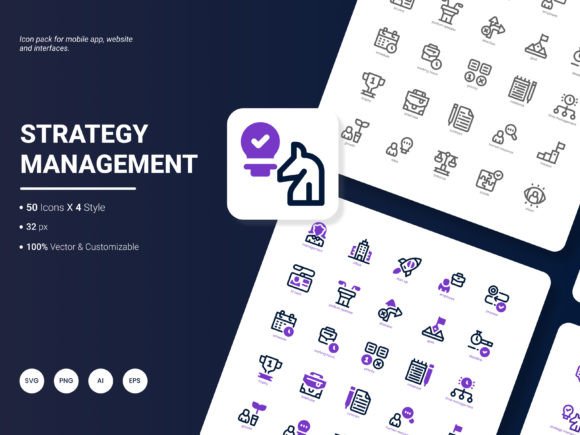
If you have ever spent hours searching for the right visual to explain a business model, a marketing funnel, or a strategic roadmap, you already know how much time that eats up. The Strategy Management Icon Pack is built to solve exactly that problem. It includes 200 stylish icons that cover popular services and ideas related to strategy, planning, analysis, and execution. Whether you are building a website, designing a mobile app, preparing a presentation, or putting together an analytical report, this set gives you a consistent visual language to work with. The icons come in AI, EPS, SVG, PNG, PDF, and JPG formats, with four style variations, and they are fully editable. That means you can tweak colors, resize without losing quality, and integrate them into almost any tool or platform you already use.
What makes this pack stand out is not just the number of icons, but how directly they apply to real work. Strategy management is a broad field. It covers SWOT analysis, competitor mapping, goal setting, resource allocation, performance tracking, and many other activities that benefit from clear visuals. When you have a set of icons that speak to each of those areas, you save yourself the trouble of mixing mismatched graphics from different sources. The result is a cleaner, more professional look that your audience will notice, even if they cannot articulate why.
Where Strategy Management Icons Fit Into Everyday Work
Think about the last time you had to explain a strategic concept to someone on your team. Maybe it was a new growth initiative, a shift in target audience, or a reallocation of budget. Chances are, you used a slide deck, a document, or a dashboard to get your point across. Now imagine having a set of icons that represent each element of your plan: a target for goals, a handshake for partnerships, a graph for performance, a shield for risk management, a gear for operations, and a lightbulb for innovation. That is exactly what this icon pack delivers.
For marketers, these icons are useful in campaign presentations, client proposals, and content marketing assets. Instead of relying on generic clip art or overused stock images, you can use icons that feel modern and specific. A slide about competitive analysis becomes instantly clearer when you pair it with a simple icon representing market share or competitor positioning. For entrepreneurs and small business owners, the pack helps when you are pitching to investors or laying out your business model. You do not need to be a designer to produce something that looks polished. Drop an SVG icon into your pitch deck, adjust the color to match your brand, and you are done.
In educational settings, teachers and trainers often need to simplify complex frameworks. A strategy management icon can turn an abstract concept like value chain analysis into something students can grasp visually. If you are a freelancer or consultant, your proposals and reports become more persuasive when they include icons that reinforce your message. Clients respond better to materials that look organized and intentional. That small investment in visual consistency can set you apart from competitors who still rely on text-heavy documents.
How Different Users Benefit in Specific Scenarios
Let me walk through a few concrete scenarios so you can see how this plays out in real life.
Scenario 1: The Startup Founder Preparing a Pitch Deck
You are a founder with a solid business plan and a few early customers. You need to raise seed funding, so you are putting together a pitch deck. Every slide matters. You want to show your go-to-market strategy, your revenue model, your competitive advantage, and your growth projections. With the Strategy Management Icon Pack, you can pick an icon for each slide header: a compass for strategy, a rocket for growth, a bar chart for financials, a target for goals, and a handshake for partnerships. The icons are available in SVG and PNG, so you can drop them directly into your design tool. Because they are editable, you can adjust the stroke weight or color to match your brand guidelines. The result is a deck that looks cohesive and professional without requiring a design degree.
Scenario 2: The Marketing Manager Building a Quarterly Report
You need to present Q3 results to the leadership team. Your report includes sections on campaign performance, budget utilization, competitive landscape, and strategic recommendations. Instead of using the same boring charts and tables, you add icons to section dividers and callout boxes. A magnifying glass icon next to your market research findings. A chart icon next to your performance metrics. A target icon next to your recommendations. The icons help the leadership team scan the document quickly and understand the structure before they dive into details. The four style options let you choose whether you want filled icons, outline icons, or something in between, depending on your document's aesthetic. The AI and EPS formats are especially handy if your design team wants to tweak the icons further.
Scenario 3: The Freelance Consultant Creating a Client Proposal
You are a strategy consultant pitching a transformation project to a mid-sized company. Your proposal includes a diagnostic framework, a set of recommendations, an implementation roadmap, and a timeline. You want the client to see your methodology clearly. Using icons from this pack, you illustrate each phase: a checklist for the diagnostic, a puzzle piece for integration, a calendar for the timeline, and a graph for expected outcomes. The client perceives your proposal as more credible and easier to follow. Because the icons are available in PDF and JPG, you can also use them in email attachments or printed materials without worrying about format compatibility.
Scenario 4: The Educator Designing a Course Module
You teach a business strategy course at a university or online platform. Your module covers Porter's Five Forces, the BCG matrix, and the balanced scorecard. Each of these frameworks is abstract and benefits from visual anchors. You can use icons from the pack to create simple diagrams that students can refer to when studying. A fist icon for competitive rivalry, a building for supplier power, a customer for buyer power, a shield for threat of new entrants, and a box for threat of substitutes. Students find these visuals more memorable than plain text. The PNG format is easy to insert into slides or learning management system pages. The SVG format works well if you want to create interactive diagrams for your course website.
What to Consider Before Choosing an Icon Pack
Not all icon packs are created equal, and it helps to know what to look for before you commit. One of the first things to consider is format compatibility. The Strategy Management Icon Pack covers six formats, which is more than most packs offer. AI, EPS, and SVG are vector formats, so they scale infinitely without losing quality. PNG and JPG are raster formats, useful for quick placement in documents or web pages. PDF is a universal format that works for printing or sharing with clients who may not have design software. If you work across multiple tools, having all these formats means you are never stuck.
Another factor is editability. Many icon packs lock you into a single color scheme or style. This pack allows you to change colors, resize, and combine icons with others because the vector files are ungrouped and well-organized. If you need a blue version of the target icon to match your brand, you can do that in seconds. If you need a larger version of the handshake icon without pixelation, vector formats handle that effortlessly.
Consistency is another consideration. A good icon pack maintains a uniform visual style across all icons. The Strategy Management Icon Pack offers four style options, which gives you flexibility while keeping a cohesive look. Whether you choose filled, outline, or another variation, the icons feel like they belong together. That matters when you are building a website, a presentation, or an infographic where visual harmony is important.
Content relevance is also worth thinking about. This pack focuses on strategy management services and ideas. If your work regularly involves strategic planning, business analysis, project management, or organizational development, the icons will directly apply. If you need something very niche, like icons specific to healthcare strategy or supply chain logistics, you may need to supplement this pack with additional assets. But for most business and professional use cases, the 200 icons cover a wide range of common concepts.
Connecting Features to Real Outcomes
Let me tie the features directly to outcomes you can expect.
Having 200 icons means you rarely need to search for a missing icon in the middle of a project. You can find something close enough to the concept you are communicating. Six formats mean you can use the icons in web design, print, presentations, documents, and mobile apps without format conversion headaches. Four styles give you creative control over the look and feel, so your materials do not all look identical. Editable vectors mean you are not stuck with the default colors or shapes; you can adapt them to match your brand. And popular content means the icons are based on real-world concepts that your audience will recognize.
These features translate into tangible benefits. You save time because you do not have to create icons from scratch or hunt through multiple libraries. You improve communication because your audience understands your visuals faster. You enhance credibility because consistent, professional icons make your work look more polished. And you reduce frustration because the files work with the tools you already use.
Ideas for the Next Update
No icon pack is ever truly finished, and the creators have asked for suggestions on what to include next. Here are a few ideas based on common gaps in strategy-related icon sets. Adding icons for ESG (environmental, social, governance) would be useful, since sustainability strategy is becoming a priority for many organizations. Icons for remote work strategy, such as distributed team coordination, virtual collaboration, and asynchronous communication, would also be timely. Another area is data-driven decision making, including icons for data pipelines, dashboards, and predictive analytics. Finally, icons representing organizational culture, such as values alignment, team norms, and change management, would round out the strategic management focus. These additions would make an already practical pack even more relevant to current business challenges.
If you work with strategy concepts regularly, the Strategy Management Icon Pack is a practical addition to your toolkit. It saves time, improves clarity, and helps you produce materials that look intentional and professional. Whether you are a founder, a marketer, a consultant, or an educator, having a reliable set of icons at your fingertips means you can focus on your message instead of wrestling with visuals.